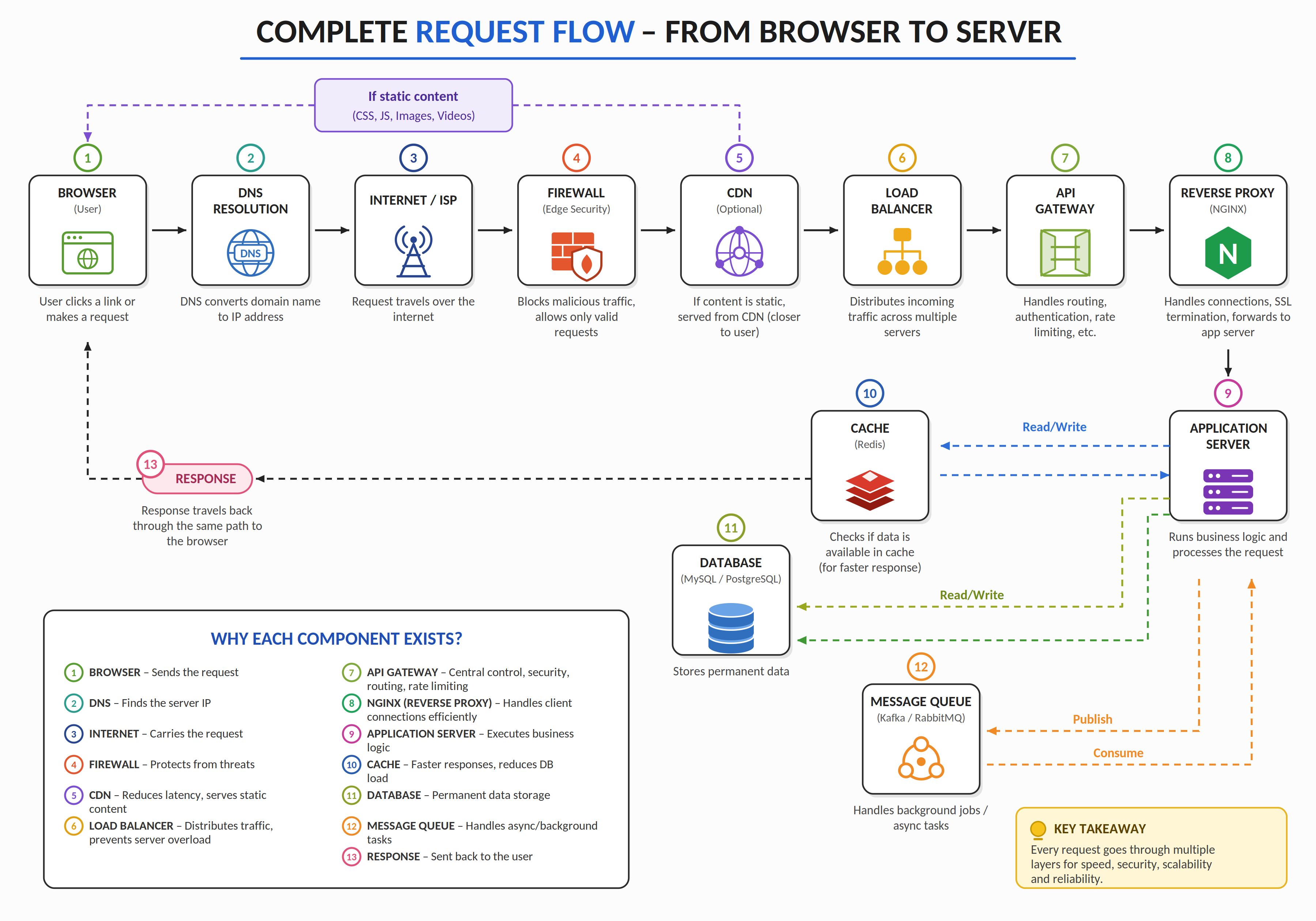
1. Introduction & Core Philosophy
In modern software engineering, backend systems can quickly become complex. However, across production codebases, 90% of backend communication relies directly on the HTTP (Hypertext Transfer Protocol) layer—the fundamental protocol enabling client-server interactions across the web.
Whether you are building web APIs, microservices, or full-stack web applications, mastering HTTP mechanics is essential for designing fast, resilient, and secure systems.
2. Core Pillars of the HTTP Protocol
+------------------+                    +------------------+
|   Client         |                    |   Server         |
| (Web Browser/App)|                    | (API / Web Server|
+------------------+                    +------------------+
         |                                       |
         | --- 1. HTTP Request (Self-Contained)->|
         |     [URL, Headers, Auth Token/Cookie] |
         |                                       | (Processes request &
         |                                       |  forgets context)
         | <-- 2. HTTP Response -----------------|
         |     [Status 200, Headers, Body]       |
         |                                       |
         | --- 3. New Independent Request ------>|
         |     [Must send Auth credentials again]|
A. Statelessness
- Definition: The server maintains no memory of past interactions. Every incoming HTTP request must be self-contained, carrying all parameters, headers, URL data, authentication tokens, or cookies required for execution.
- Architecture Benefits:
- Simplicity: Eliminates the overhead of managing session state in server memory.
- Scalability & Resiliency: Requests can be distributed seamlessly across stateless load-balanced servers. If one server crashes, no client state is lost.
- Managing Session State: To maintain user logins or shopping carts over a stateless connection, applications layer cookies, session stores, and JSON Web Tokens (JWTs) on top of HTTP.
B. Client-Server Model
- Client: Web browsers, mobile apps, or external APIs that always initiate requests.
- Server: Hosts application logic and databases, processing requests and returning structured responses.
- HTTP vs. HTTPS: HTTPS secures plain-text HTTP communication with TLS/SSL encryption and digital certificates, protecting sensitive data in transit against eavesdropping and tampering.
3. Network Stack & Protocol Evolution
A. Reliable Transport (TCP over UDP)
HTTP requires a reliable layer-4 transport protocol that prevents packet loss and guarantees message ordering. Traditional HTTP relies on TCP (Transmission Control Protocol).
B. OSI Layering
Backend application code operates at Layer 7 (Application Layer) of the OSI model, relying on underlying layers to manage lower-level TCP 3-way handshakes and TLS certificate exchanges.
C. Evolution of HTTP Versions
HTTP 1.0 : [Req1]->[Res1] | [Req2]->[Res2]   (New TCP connection per request)
HTTP 1.1 : [Req1]->[Res1] -> [Req2]->[Res2] (Persistent TCP connection / Keep-Alive)
HTTP 2.0 : [Req1, Req2, Req3 Streamed] ---> (Multiplexing over 1 TCP connection)
HTTP 3.0 : [QUIC over UDP Streams] --------> (No Head-of-Line Blocking, faster TLS)
- HTTP/1.0: Opened and closed a separate TCP connection for every single request/response pair, creating massive latency overhead.
- HTTP/1.1: Introduced Persistent Connections (
Connection: keep-alive), allowing multiple sequential requests over a single TCP socket, alongside chunked encoding and improved caching controls. - HTTP/2.0: Introduced Multiplexing (parallel request/response streams over a single connection), Binary Framing, Header Compression (HPACK), and Server Push.
- HTTP/3.0: Built on top of QUIC over UDP (replacing TCP) to eliminate Head-of-Line (HOL) blocking, speed up TLS handshakes, and improve mobile connection transitions.
4. Anatomy of HTTP Messages
An HTTP transaction consists of structured plain-text or binary messages sent between client and server.
A. Request Message Structure
- Request Line: Method (
GET), Resource Path (/api/v1/users), and Protocol Version (HTTP/1.1). - Request Headers: Metadata key-value pairs (e.g.,
Host,User-Agent,Authorization,Accept). - Blank Line: Mandatory CRLF (
\r\n) delimiter marking the end of headers. - Request Body: Optional payload (JSON payload, form values, or binary data).
B. Response Message Structure
- Status Line: Protocol Version (
HTTP/1.1), Numeric Status Code (200), and Reason Phrase (OK). - Response Headers: Server and representation metadata (e.g.,
Content-Type,Cache-Control,ETag). - Blank Line: Delimiter before payload.
- Response Body: Returned data resource (e.g., HTML, JSON, images).
5. HTTP Headers & Security Controls
A. The Courier Parcel Analogy
Think of HTTP headers like details printed on the outside of a courier delivery box. Intermediary load balancers, proxies, and web servers can inspect header metadata (routing, content type, authorization) without having to open or parse the entire internal payload body.
B. Categories of Headers
- Request Headers: Client environment context (
User-Agent,Authorization,Accept). - General Headers: Message-level context (
Date,Cache-Control,Connection). - Representation Headers: Body format and payload dimensions (
Content-Type,Content-Length,Content-Encoding,ETag). - Security Headers: Essential controls for browser hardening:
Strict-Transport-Security(HSTS): Forces browsers to interact exclusively over HTTPS.Content-Security-Policy(CSP): Restricts script execution sources to mitigate Cross-Site Scripting (XSS).X-Frame-Options: Prevents Clickjacking by disabling<iframe>embedding.X-Content-Type-Options: nosniff: Prevents MIME-type sniffing attacks.Set-Cookie: Flags likeHttpOnlyandSecureblock client-side JavaScript cookie theft and restrict transmission to encrypted connections.
6. HTTP Methods & Idempotency
Understanding method semantics ensures predictable API behaviors and prevents state bugs.
A. Core HTTP Methods
GET: Retrieves data without modifying server state.POST: Creates a new resource on the server.PUT: Completely replaces an existing resource with the request payload.PATCH: Partially updates or mutates an existing resource.DELETE: Removes a designated resource.
B. Idempotency Matrix
| Method | Idempotent? | Safe? | Description |
|---|---|---|---|
GET | Yes | Yes | Multiple identical requests leave server state unchanged. |
PUT | Yes | No | Executing the same update 1 or 100 times yields the exact same state. |
DELETE | Yes | No | Deleting a resource once or multiple times leaves it removed. |
POST | No | No | Repeated calls create multiple separate duplicate entries. |
PATCH | No | No | Can be non-idempotent depending on operation (e.g., appending items). |
7. OPTIONS Method, SOP, and CORS Deep Dive
SIMPLE REQUEST FLOW:
Client (example.com)                              Server (api.another.com)
   |                                                         |
   | --- GET /data (Origin: example.com) ------------------->|
   |                                                         |
   | <-- 200 OK (Access-Control-Allow-Origin: example.com) -|
   | (Browser allows response)                               |

PRE-FLIGHT REQUEST FLOW (JSON / PUT / Custom Auth):
Client (example.com)                              Server (api.another.com)
   |                                                         |
   | --- Step 1: OPTIONS /data (Pre-flight inquiry) -------->|
   |     [Access-Control-Request-Method: PUT]                |
   |     [Access-Control-Request-Headers: authorization]     |
   |                                                         |
   | <-- Step 2: 204 No Content ----------------------------|
   |     [Access-Control-Allow-Origin: example.com]          |
   |     [Access-Control-Allow-Methods: PUT, DELETE]         |
   |     [Access-Control-Allow-Headers: authorization]       |
   |                                                         |
   | --- Step 3: Actual PUT /data -------------------------->|
   | <-- 200 OK (Response Payload) --------------------------|
A. Same-Origin Policy (SOP) vs. CORS
- Same-Origin Policy (SOP): A fundamental browser security boundary blocking scripts on one origin (e.g.,
https://app.com) from making uninhibited API requests to another domain (https://api.another.com). - Cross-Origin Resource Sharing (CORS): An HTTP-header-based protocol that allows servers to grant explicit permission to cross-origin web clients.
B. Simple vs. Pre-Flight Request Flows
- Simple Requests: Triggered by simple verbs (
GET,POST,HEAD) with default standard headers and simple content-types (application/x-www-form-urlencoded,multipart/form-data,text/plain). The browser includes anOriginheader, and the server validates it usingAccess-Control-Allow-Origin. - Pre-Flight Requests (
OPTIONS): Triggered when requests use complex content-types (application/json), custom headers (Authorization), or non-simple verbs (PUT,DELETE).- Step 1: The browser automatically issues an
OPTIONSrequest asking the server for permitted origins, verbs, and headers. - Step 2: The server responds with
204 No Contentalong with CORS headers (Access-Control-Allow-Origin,Access-Control-Allow-Methods,Access-Control-Allow-Headers). - Step 3: Once verified by the browser, the actual
PUT/POSTHTTP request is dispatched.
- Step 1: The browser automatically issues an
8. HTTP Response Status Codes Quick Reference
| Code Range | Category | Common Examples & Key Usage |
|---|---|---|
1xx | Informational | 100 Continue (large uploads), 101 Switching Protocols (WebSocket upgrade). |
2xx | Success | 200 OK (success), 201 Created (POST creation), 204 No Content (empty body success). |
3xx | Redirection | 301 Moved Permanently, 302 Found (temporary), 304 Not Modified (cache hit). |
4xx | Client Errors | 400 Bad Request, 401 Unauthorized (unauthenticated), 403 Forbidden (permission denied), 404 Not Found, 409 Conflict, 429 Too Many Requests (rate limiting). |
5xx | Server Errors | 500 Internal Server Error, 502 Bad Gateway, 503 Service Unavailable, 504 Gateway Timeout. |
9. HTTP Caching Architecture
Client (Browser)                                    Server
   |                                                   |
   | --- Initial GET /resource ----------------------->|
   |                                                   |
   | <-- 200 OK (Cache-Control: max-age=10, ETag: "A")-|
   |     (Stores payload + ETag "A" in cache)          |
   |                                                   |
   | ... (Subsequent Request) ...                      |
   | --- GET /resource (If-None-Match: "A") ---------->|
   |                                                   |
   |                                       (ETag unchanged)
   | <-- 304 Not Modified (No Body) -------------------|
   |     (Browser loads payload from local cache)      |
- Purpose: Caching significantly reduces response latency, bandwidth consumption, and server load.
- Key Control Headers:
Cache-Control: max-age=3600: Specifies cache freshness duration in seconds.ETag: A unique hash representing the exact version of a server resource.
- Revalidation Cycle: When a cached entry expires, the browser dispatches
If-None-Match: <ETag>. If the server resource has not changed, it returns304 Not Modifiedwith an empty body, instructing the browser to instantly reuse its local copy.
10. Content Negotiation & Compression
- Dimensions of Negotiation:
- Format:
Accept: application/jsonvs.application/xml - Encoding:
Accept-Encoding: gzip, br - Language:
Accept-Language: en-US
- Format:
- HTTP Compression: Compressing text payloads with algorithms like gzip or Brotli dramatically reduces transfer sizes. For instance, compressing a 26 MB JSON dataset down to 3.8 MB yields faster page loads and massive bandwidth savings.
11. Handling Large Data Transfers
- Large Client Uploads (
multipart/form-data): Sends binary files in distinct chunks bounded by uniqueboundarystring delimiters in the body. - Real-Time Streaming (
text/event-stream/ Server-Sent Events): Keeps the connection alive to stream data chunks incrementally without waiting for the full dataset to load in memory.
12. Transport Security Summary (SSL/TLS/HTTPS)
- SSL: Deprecated transport security layer; replaced by TLS.
- TLS (Transport Layer Security): Modern cryptographic protocol providing server identity authentication (via digital certificates) and symmetric data encryption.
- HTTPS: Secure HTTP running over encrypted TLS tunnels.